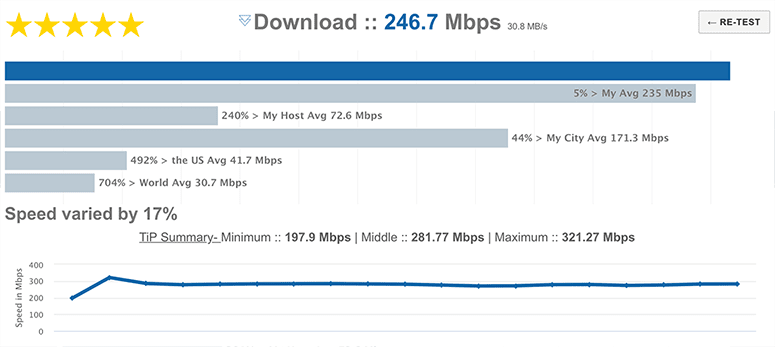
Download Speed Test
Check the download bandwidth speed of your Internet connection. Large tests, random data and no 3rd party applications ensure accurate connection testing.
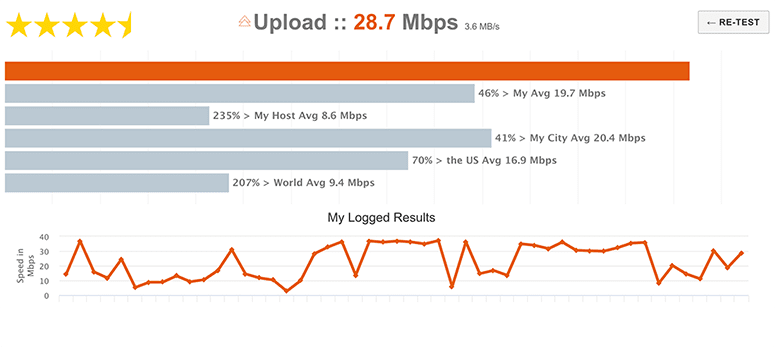
Upload Speed Test
Check the upload bandwidth speed of your Internet connection using the same browser form submission upload that popular sites like youtube utilize.
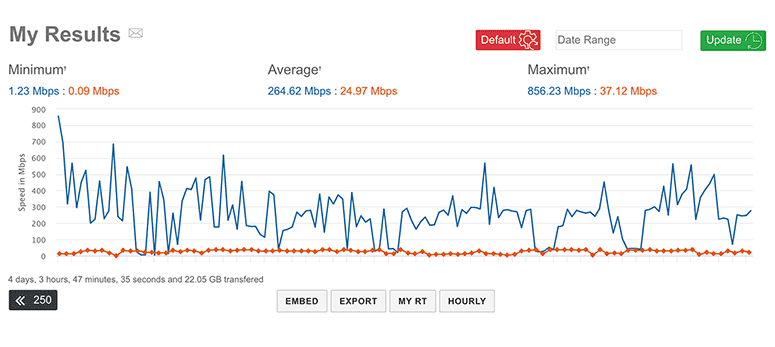
Automatic Speed Test
Benchmark Internet connection bandwidth automatically. The automatic speed test is an easy way to make sure your provider is delivering what you're paying for.
Internet Speed Test
TestMy.net is a powerful broadband speed test that will test your Internet, calculate your transfer rate and output accurate, reliable and easy to understand results. TestMy.net is an independent third party and is not affiliated with your Internet service provider. Our results are unbiased because TMN has no vested interest in the outcome of your speed test.
We work for the Internet consumers not the Internet providers. First to offer the ability to log test results, test upload speed and automatically test Internet speed. TestMy.net has been pioneering the bandwidth speed test since 1996.
Why Test My Internet Speed?

Simple, to make sure you're getting what you pay for. This speed test is useful if you feel a connection slow down or want to see how your Internet is performing. This isn't like any other broadband speed test. TestMy's proprietary method is proven to help identify issues other speed tests fail to detect. The TestMy.net Speed Test shows your true speed.
About TestMy.net
This bandwidth speed test has been in development since 1996 and has benchmarked performance on millions of Internet connections. People keep choosing TestMy.net because the results have been proven accurate and reliable.

TestMy has a unique testing method and can help you diagnose connection, browser and operating system issues that other speed tests fail to detect.
No other major broadband speed test offers testing with such large files. Most don't even tell the user how much information has been transferred, TestMy.net takes a different approach. TestMy is the most unrestricted bandwidth speed testing resource on the Internet. We have dedicated, centralized servers with multiple gigabit uplinks and multi-homed connectivity to over 25 Tier1 bandwidth providers. So whether it's Fiber, Cable, DSL, Mobile Broadband, Satellite or Dial-up TestMy will output accurate, Read morereliable speed test results.
What makes TestMy.net Different?

TestMy.net will provide you with real-world broadband speed test results in real-world conditions. We stand for the consumer, TestMy does not inflate scores to make your provider look better than they are or host our test servers on the edge of ISP networks. Our speed test servers are configured to maintain quality of service for thousands of miles and are hosted in locations where many popular websites are hosted. We believe this is a more accurate representation of your true speed.
Most Internet customers don't think about the Internet service providers responsibility in peering beyond their own network. Many Internet providers send users to their own internally hosted connection test. When you surf the net, how often are you visiting a server within your hosts network?
When you buy something do you normally trust the seller to inspect it for you?
Read more →Then why would you trust your ISP to test your Internet... TestMy.net has been a trusted speed test since 2001.
You'll notice the ‘TiP’ or Test in Progress data on TestMy.net download test results you'll realize that numbers can easily be altered without lying. It is common practice among other speed tests to calculate the result based on incomplete information.
Speed tests showing the maximum speed or average speeds can be HIGHLY deceiving, even experienced technicians can be tricked. The fact is, if the information used to calculate the result is altered... the result is null. The final score presented to you by TestMy.net takes everything into account, from start to finish. Nothing is altered. The ‘TiP’ data is also shown so you can interpret the results the way you want. Remember, TestMy.net is a third party and has no vested interest in your test results. Your ISP can't say that.

Routing Distribution
TestMy.net has a network of servers. If you suspect a connection issue use “Servers” option to test against other locations. This can help diagnose whether an issue is due to Internet routing or if it has to do with your home network and/or computer itself.
Web Browser Performance
TestMy.net is the first and only truly accurate HTML5 & PHP driven speed test online. Other online speed tests require third party applications, TMN uses only your web browser - no Flash, no Java. This makes TestMy's speed test more sensitive to browser misconfiguration and is an excellent way to highlight performance differences between browsers.
Users of TMN can see all browsers are not created equally. Since early development in 1996 this speed test has never required anything more than an Internet connected web browser. Don't let other so-called "tests" fool you... TestMy.net is the original truly accurate browser based Internet speed test.
Mobile Device Testing
Use TestMy.net's same powerful bandwidth testing tools on Android and iOS (iPhone, iPod and iPad). Just visit TestMy.net in your devices default web browser or use TestMy.net to highlight performance differences between different mobile browsers.
TMN is a great iPad and iPhone speed test because flash and other plug-ins aren't required. No app necessary, just go to TestMy.net. TestMy's graphing system and client-side code are completely HTML5 compliant so iPad users as well as other devices can experience TMN just as they would on a desktop computer. In the footer easily switch between mobile and desktop GUI both running the same powerful test core.
Speed Test Flow
When you request a speed test the test data is created randomly. You're not downloading or uploading any real information. This means every TestMy.net speed test is unique, making host caching of the data difficult. When your speed test starts so does a timer, precision of which is measured in ten thousandths of a second. Also, data sizes are precise to the individual byte.

Once the flow of information is finished the timer is stopped and your results are calculated. Test results are calculated first with a simple equation, (size / time) and the resulting number is used to calculate all of your final results. Your result is then compared against your own previous results as well as to other connections in your area, on your host and across the Internet.
At TestMy.net you're testing more than just your connection. Because of the way TMN is designed at higher connection speeds it's a great gauge of browser and computer performance. Its abilities to detect issues with your computer extend beyond your Internet connection. TMN picks up on issues other speed tests are designed to not notice. Other speed tests are usually designed with one goal in mind, achieve the fastest result. Make the providers look good. TestMy.net is made by a consumer for the consumer.
Improper TCP settings, bad modems and even slow hard drive performance are only a few issues TestMy.net has been known to reflect when others don't. Why don't other speed tests see the same issues? Almost all other speed tests are well known to adjust results, often ignoring the exact variables you come to test. TestMy.net does not adjust anything, from start to finish - everything is calculated.
TestMy.net is a powerful speed test network across North America, South America, Europe, Australia, Africa and Asia.